
AI for Accountants: Tax Season Calls, Document Chasing and AI Bookkeeping
Where AI actually helps a small accounting firm: tax season calls and emails, chasing client documents, what AI bookkeeping tools do, and what CPA Ontario, the Ordre des CPA du Québec and Law 25 say about confidentiality.

If you run a small practice and you're wondering where AI for accountants actually helps, I'd start with the admin around tax season, meaning the phone, the inbox and the chasing of documents, and not the tax work itself. An AI assistant can answer the routine calls and emails, send clients the checklist and the upload link, remind them about what's still missing and book their appointment, and then the accountant does the accounting. Bookkeeping has its own kind of AI, mostly built into software you already use. I'm mostly writing for small firms in Quebec and Ontario.
Why tax season is the place to start
For most of the year the phone at a small firm is manageable, and then February comes. The CRA says in its notice for the 2025 filing season that it received more than 33 million income tax and benefit returns during the season before, and that the deadline for most people is April 30, or June 15 if they're self-employed. Plenty of those go through a firm, and every client seems to come with a call or two.
Even the companies that sell answering services say this pretty openly. Ruby's page for accounting firms says January through April puts just about every firm's phone coverage to the test, and that hiring around seasonal call volume isn't always practical. That's a sales page, but I don't think anyone who has worked a tax season would argue.
And it's mostly the same questions. Are you taking new clients, did you get my T4, when can I drop off my paperwork. Whoever is closest to the phone ends up answering those in between everything else.
Who picks up the phone
There are really two ways to go about this. The older one is an answering service for accountants, which usually means live people answering in your firm's name, and Ruby's page talks about people who follow your instructions, take details and book appointments. If you're in Quebec I'd look at the language first, because that page lists English and Spanish, and a lot of your callers are going to want French.
The other way is an AI receptionist, which is software that answers first. Say somebody calls at 8 p.m. in March. The agent picks up in French or English and tells them plainly that it's an automated assistant, and then it works out if they're already a client or somebody new. A new person gets asked for their name, how to reach them and what work they need, and it offers a consult time from your calendar. An existing client asking what's still missing can get the checklist and the secure upload link sent again.
But if they ask a real tax question, whether they can claim something for example, it doesn't try to answer. It books a time with their accountant or leaves a note for a callback, and anything you've decided is urgent, say a CRA notice with a short deadline, goes to whoever is on call.
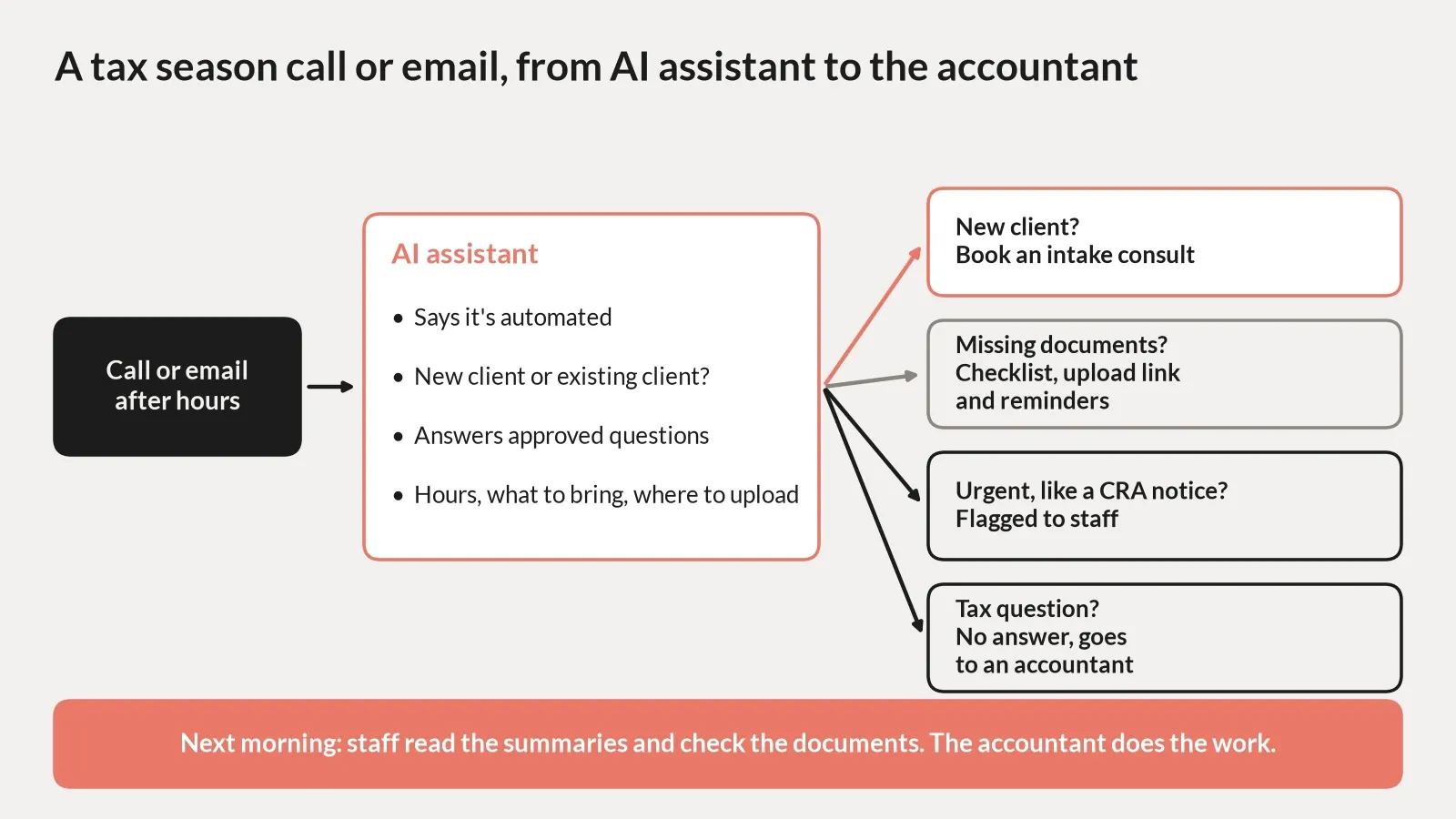
How a tax season call or email can flow from an AI assistant to the accountant.
Accounting firm automation and the chasing of documents
A lot of what gets sold as AI for accounting firms is really just plain automation, and I don't think there's anything wrong with that. The one I'd look at first is document chasing. Somebody in most offices spends a good part of March sending the same follow up email, and a sequence can send the checklist when the engagement starts, remind the client a week later about whatever hasn't come in, and stop once the upload shows up. Letting clients pick their own drop off or review time is the other piece, and that's mostly booking automation hooked up to the calendar you already use.
Where it starts to need actual AI is when the client writes back with something the sequence didn't plan for. Say they reply that their T5 is coming next week. A plain reminder would go out again tomorrow anyway, and an agent can read that and move it to next week. That's the kind of thing we build with AI agents for accounting firms.
AI bookkeeping, and where firms are with it
So how far along are firms here? Xero put out a State of the Industry report in 2025 where they surveyed 250 accountants and bookkeepers in practices across Canada. Most of the practices, 86%, were using cloud accounting software, but they were only using it in 59% of their client engagements, so there's still a fair amount done the older way.
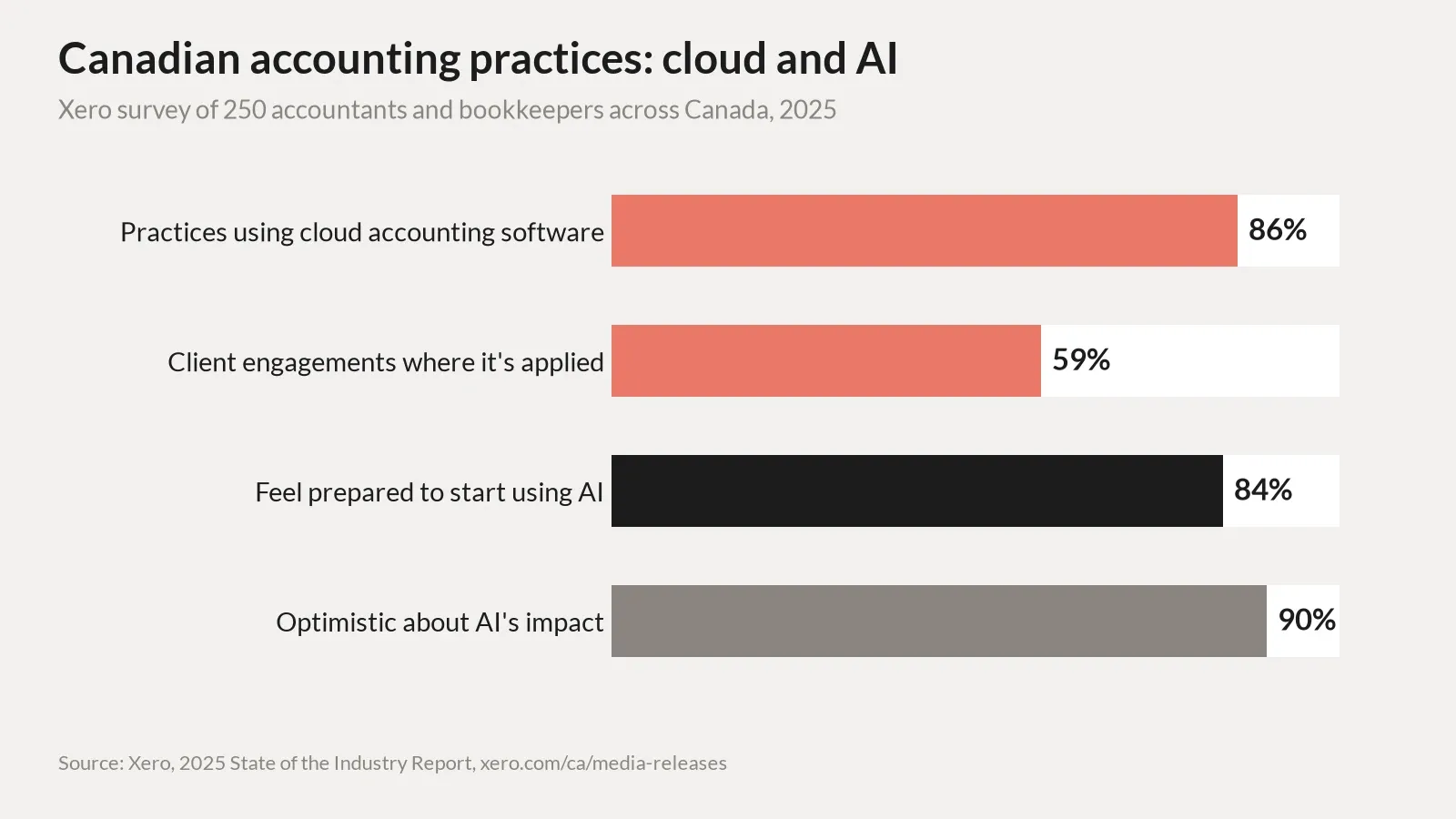
Source: Xero, 2025 State of the Industry Report, survey of 250 Canadian accountants and bookkeepers.
When people search for AI bookkeeping they're mostly looking for software, so I'll just go through what a few of these tools say they do. I'm not recommending any of them.
QuickBooks Online says in a Canadian help article that it now uses AI to put downloaded bank transactions into categories and explain why it picked each one, and you still post them yourself. Xero has something close to that on its bank reconciliation page. Their AI feature, JAX, matches and categorises transactions when it's highly confident and leaves a suggestion for you to approve when it isn't.
Then there's receipts. QuickBooks has a receipt scanner that reads the vendor, amount, date and payment method off a photo and matches it to an expense or makes a new one. Dext's getting started guide for accountants says documents come in by upload, app, email or WhatsApp, it reads the supplier, date, total, tax and currency, and someone at the firm reviews and codes them before they go into the client's books.
So in every one of these the software is making a suggestion and a person is still looking at it before anything is final. That fits with the other part of Xero's survey too, where 84% said they feel prepared to start bringing AI into their practice and 90% were optimistic about what it would do for their business. Xero sells this software, so you'd expect them to put those numbers up front, but I don't find them hard to believe either.
Confidentiality and the CPA rules
This is general information and not professional or legal advice, and your order or a privacy lawyer gets the final word.
If you're in Ontario the thing I'd read first is CPA Ontario's guidance on the responsible use of AI from June 2026. It says accountability stays with the CPA and AI output has to be reviewed before you use it, and under Rule 208, which is the confidentiality rule, you shouldn't put confidential or personally identifiable information into an AI tool unless the environment has been verified as secure and compliant. Quebec is pretty similar. The Ordre des CPA du Québec has a guide to good AI practices that says not to put confidential, personal or sensitive information into a tool that doesn't guarantee its confidentiality.
Privacy law sits on top of all that. Back in December 2023 Canada's privacy commissioners published principles for generative AI, and one of them is that when an AI tool is facing the public, people should know they're dealing with AI, which is why the receptionist says it's automated up front. In Quebec you've also got Law 25 to think about. The Commission d'accès à l'information explains that before personal information goes to anyone outside Quebec, and that includes another province, or before someone outside Quebec handles it for you, you need a privacy impact assessment and a written agreement. So I'd keep the script narrow and read the vendor's terms on where the data is stored.
Where I'd start
If I were looking at AI for accountants at a small firm I'd pick one thing to try before next tax season, probably the document reminders or the after hours calls, whichever one takes up more of your time in March. I've written about AI receptionists for clinics, AI receptionists for gyms and AI for law firms, and there's a wider piece on AI agents for small business too.
FAQ
Can an AI receptionist answer tax questions?
It shouldn't. Set it up for hours, what to bring and where to upload, and send tax questions to an accountant.
Is AI bookkeeping accurate enough to trust?
The tools are built around a person reviewing. QuickBooks and Xero describe suggestions you approve, and Dext has you review and code items first.
Can I use AI for accountants if my clients are in Quebec?
Generally yes, with care. The Ordre des CPA du Québec has guidance, and Law 25 adds rules for data handled outside Quebec.
Does an answering service for accountants need to speak French?
In Quebec I'd say yes. Ask the vendor directly, since some list only English and Spanish.
Next step
If you're wondering whether any of this would help before next tax season, book a call with Tom and we can work out whether it's worth testing.