
One AI Agent or Several? What Small Businesses Should Build
On Oct 22, 2026 Anthropic said a single AI agent with skills often beats a crowd of specialist agents. Here's what that means if you're setting up agents for a store or small business.

This question comes up a lot when people start looking at agents, so the timing on this one was nice. Anthropic, the company that makes Claude, put out an article saying that a lot of the time one AI agent with good instructions does better than a whole team of specialist agents passing work around. People on X were sharing it all week. And I know it reads like something for big companies with AI teams, but honestly it's more useful for a five person shop than for anyone.
So the short answer, if you run a store or a small business, is start with one agent. Give it written instructions for each job, a few tools, and rules about what it has to ask you before it does anything. You only bring in a second agent when you've got an actual reason, and "it seems more organized" isn't one (more on that below).
What Anthropic actually said
The article came out on October 22, 2026 and it's really written for developers building on their platform, so I'll skip the jargon. Their Applied AI team looked at a bunch of setups at companies they work with, and one agent with "skills" kept doing as well or better on quality than the two usual alternatives, which are one giant prompt that tries to cover everything, or a bunch of smaller agents that each do one thing. It was often cheaper and quicker per task as well, which I didn't totally expect.
What's a skill? Pretty much a written note on how your team does a certain job, with the steps and the rules and the little judgment calls you'd tell a new hire. The agent only sees a one line summary of each one until it actually needs it, then it pulls up the whole thing.
The article has one actual number in it, which is that a customer who tested their multi agent setup against a single agent loop found the single loop ran roughly twice as fast. AI.info, who wrote it up on October 25, pointed out that Anthropic doesn't share the full comparison behind that, which is fair, so I'd read it as a good reason to try the simpler setup first and not as proof that one agent always wins.
The org chart trap
When most people hear "AI agents" they picture a tiny company, with a support agent and an inventory agent and a marketing agent and a bookkeeping agent, and then a manager agent sitting on top telling the others what to do. It looks great on a whiteboard, and it's an easy one to fall into.
Anthropic says the big companies they work with do the same thing and it comes back to bite them, because details get lost every time one agent passes a summary to the next one (kind of like the telephone game you played as a kid), every handoff adds more waiting, and once everybody adds their own line to the instructions you end up with rules that don't agree with each other. In a store that just looks like your support agent telling a customer one shipping time while the order agent tells them a different one, or a simple "where's my order" taking ages because it went through three agents before anyone answered.
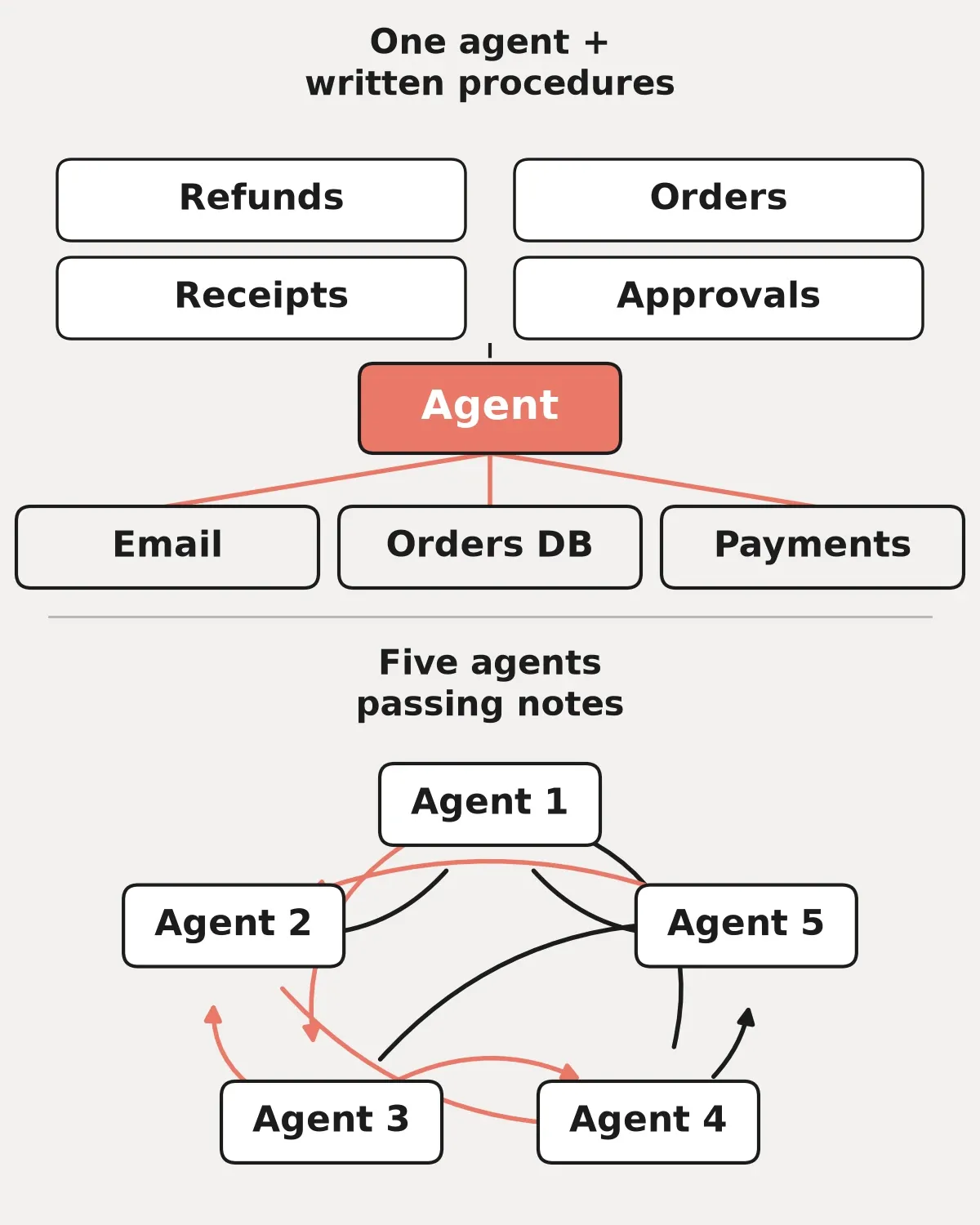
One agent with written procedures, compared with several agents passing notes.
Okay, so when do you actually want two?
To be fair there are a couple of good reasons. Say you've got a big job you want running in the background, like going through every product page each week to look for missing sizes or photos, while your main agent keeps answering customers. That's two things happening at the same time, so giving the background job its own agent makes sense. The same goes for when your main agent's instructions get so long that it starts mixing things up, and Anthropic also mentions an agent that keeps picking the wrong tool or has instructions that fight each other. But if none of that is happening to you, you'd just add another skill to the one agent you already have.
What it looks like for a small Shopify store
Let's make it real. Instead of four agents you set up one, and you give it three things.
A few written skills
These are really just documents, like how you answer "where's my order," what you tell people about sizing, your return policy and when you're willing to make an exception, and how you write product descriptions so they sound like you. A page or less for each one is plenty.
A small set of tools
This would be things like looking up an order, checking stock, drafting an email or creating a product as a draft. Anthropic suggests you group tools around what someone is trying to get done, instead of having one tool for every button in every app, and they say that once you get past roughly 30 to 50 tool definitions the agent gets worse at choosing the right one. You probably won't get anywhere close to that, but it's still a good reason not to plug in every app you own just because you can.
Hard rules inside the tools
If it were my store this is the part I'd care about most. Anthropic says things like approval steps should be built into the tools themselves and not only written in the instructions, so the refund tool simply won't run until you've said yes, and the tool that emails customers waits for you as well. That way if the agent gets confused one day it doesn't really matter, because the tool is still going to say no.
(Side note, if you were wondering about shoppers using their own AI agents to buy from you, that's the flip side of all this and we wrote about it in the post on Shopify AI shopping agents.)
Test it on ten real emails
The other thing I'd take from the article is to test before you change anything. Anthropic says 10 golden examples is enough to get started, and for a small business that could just be ten real customer emails from last month along with what a good reply would have looked like. You run the agent on those ten, you look at what it got right and what it got wrong, you change one thing, and then you run them again, and you run each one more than once because results can change from run to run. In Anthropic's own test on a sample support agent, one change made it faster but also broke the step where it was supposed to check the delivery date with the shipping specialist, and that only showed up in one run out of two. They also put out a free starter kit on GitHub for teams going from lots of agents down to one, although it's really meant for developers.
Where I'd start this month
I'd pick whatever job eats most of your week, which for a lot of stores is customer emails, and write down how you answer the five questions you get most often in plain words, the way you'd explain it to someone on their first day. Then you hook the agent up with read only access and let it draft replies for a week while you're the one hitting send, and once you trust it you add the next skill.
If you want the longer take on where agents fit in a small team, there's a full piece on AI agents for small business on the blog.
If you'd like a hand
A lot of owners can set this up on their own, and that's totally fine. But if you'd rather have someone build AI agents for small business around the way you already work, with the skills written out and the approval rules where they should be, that's what we do, and if the store itself needs some work first our ecommerce work covers that side of it.
If you're not sure whether you need one agent or three, book a call with Tom. Bring the list of jobs you'd love to hand off and we'll figure out the simplest setup that actually gets them done.