Booking Automation for Small Businesses: A Plain Guide
How booking automation works for a small service business: live availability, calendar sync, reminders, deposits, rescheduling, AI agents that book by chat or phone, and when an off-the-shelf tool is enough.
Booking automation means a customer can pick a time on your website, pay a deposit if you want one, and get a confirmation and a reminder without anybody on your side doing it by hand. For most small service businesses an off-the-shelf scheduling tool covers all of that, and most of them have a free plan, with the paid plans priced mostly in US dollars and Square's in Canadian dollars (I put the actual numbers further down). You'd only need something custom when your booking rules get unusual or the tool can't talk to the rest of your systems.
This is for anybody who takes appointments or reservations, so salons and clinics, but also studios, restaurants and contractors.
What booking automation actually covers
Most people picture a "Book now" button, and that's maybe a third of it. It's easier to see the rest if you follow one customer through.
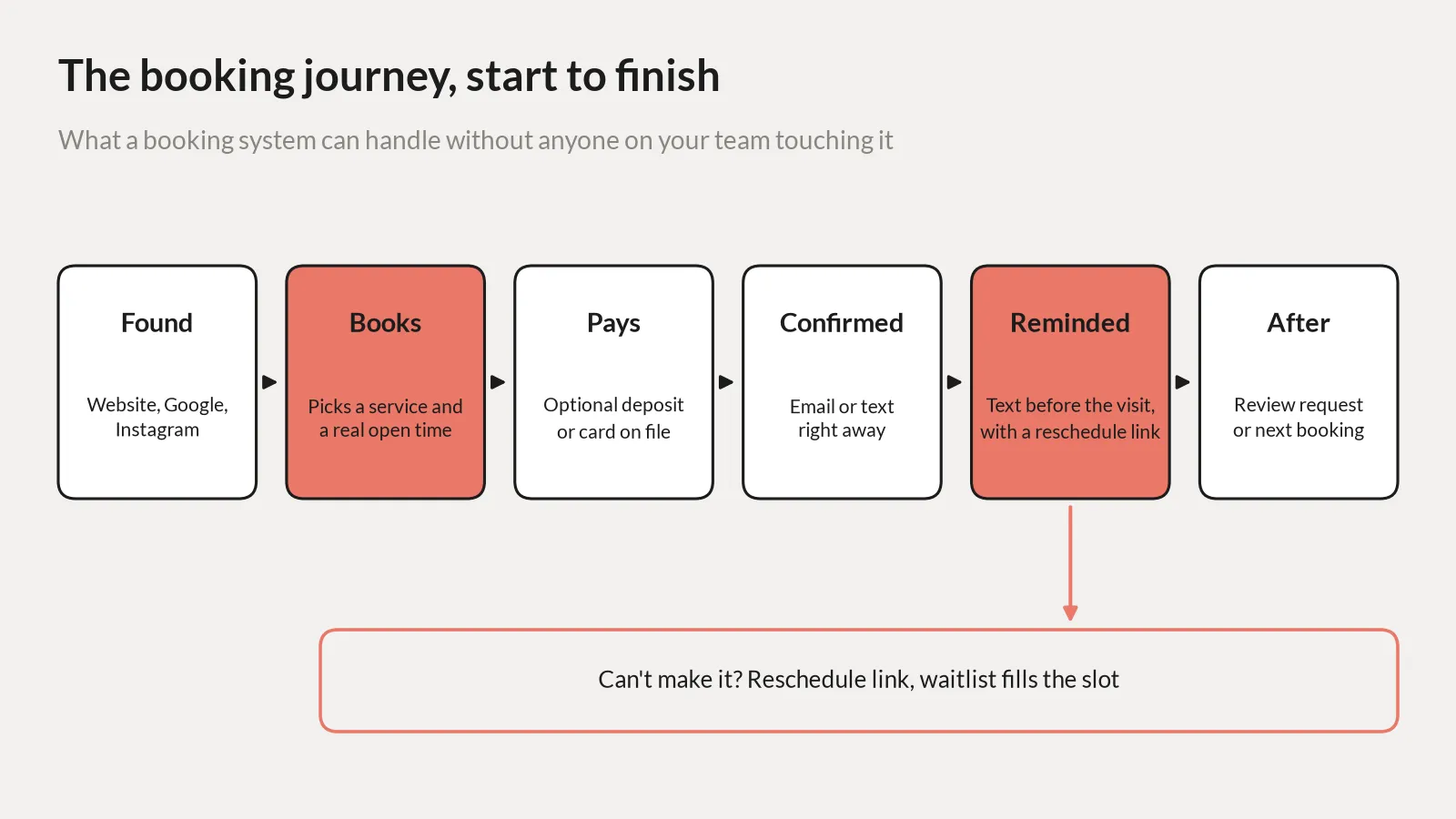
So they pick a time that's actually open, because it comes from your calendar and not from a form that says "we'll get back to you," and then the confirmation and the reminder go out on their own, with a link to move it if something comes up. Every one of those steps used to be somebody at the front desk doing it by hand, or not doing it because the phone was ringing.
Reminders, the one part with real research
There's actual research on this one. A Cochrane review pulled together randomised trials on text reminders for healthcare appointments. With a text, 78.6% of people showed up. With nothing, 67.8%. Phone calls did about as well as texts, 80.3%, and in the two studies that looked at cost, the texts came out cheaper per person who actually came in.
It's all healthcare, though, and the authors call the evidence low to moderate. Your salon might not get that exact jump. Still worth the two minutes to switch on.
Check that your plan actually sends texts. SimplyBook.me charges extra for SMS, $8 for 100 messages. Setmore's free plan only does email reminders. Texts are on Pro.
Your booking page and calendar
A contact form gets you three emails about Tuesday versus Thursday. A booking page shows the open times and they take one. Done.
You don't need a new website for it either. Square gives you a button, a QR code or a widget for the site you already have, and Setmore has widgets for Wix, Weebly and WordPress.
The part people skip is the calendar. The tool has to read the one you actually use, Google or Outlook, or somebody books right on top of your dentist appointment. That's usually where free runs out. Calendly charges for connecting more than one calendar, Square's Google Calendar sync starts on Plus, and Setmore's two way sync is on Pro.
Deposits, rescheduling and waitlists
Deposits work because now it's their money on the line. On Square Appointments you set a cancellation policy, they leave a card when they book, and if they don't show or cancel late you charge the fee. That's on Plus and Premium. Acuity takes deposits through Stripe, Square, PayPal or Venmo. Calendly does Stripe and PayPal on Standard.
I wouldn't ask for one on a first visit. It scares new people off. Keep it for the long appointments, or for people who've already missed one. And the card fees come off the top, which Square lists at 2.8% plus 30 cents per online payment in Canada.
Rescheduling is simpler. If the only way to move a booking is calling you, lots of people just won't call, and won't come. So put a reschedule link in the confirmation and the reminder. They tap it, pick a new time, and the old slot opens up. Square's Assistant does it by text too: they reply to confirm, reschedule or cancel, and the calendar updates itself. Then a waitlist pings the next person when someone cancels. Acuity has one. Square has one on Plus.
What it costs, and when you need an automated booking system built
I checked the published prices in November 2026, before tax. Calendly is free, then $10 a seat for Standard and $16 for Teams, per month billed yearly, in US dollars. Acuity Scheduling has no free plan, just a 7 day trial. Starter is $16 a month billed yearly or $20 monthly, Standard is $27 or $34, Premium is $55 or $69, also USD.
Square is the one in Canadian dollars. Free for one location, then $35 for Plus and $85 for Premium, per location a month, plus card fees. SimplyBook.me is free up to 50 bookings a month, then $13.9, $29.9 and $59.9 USD billed monthly, a bit less if you pay yearly. Setmore is free for up to 4 users, and Pro is the paid plan.
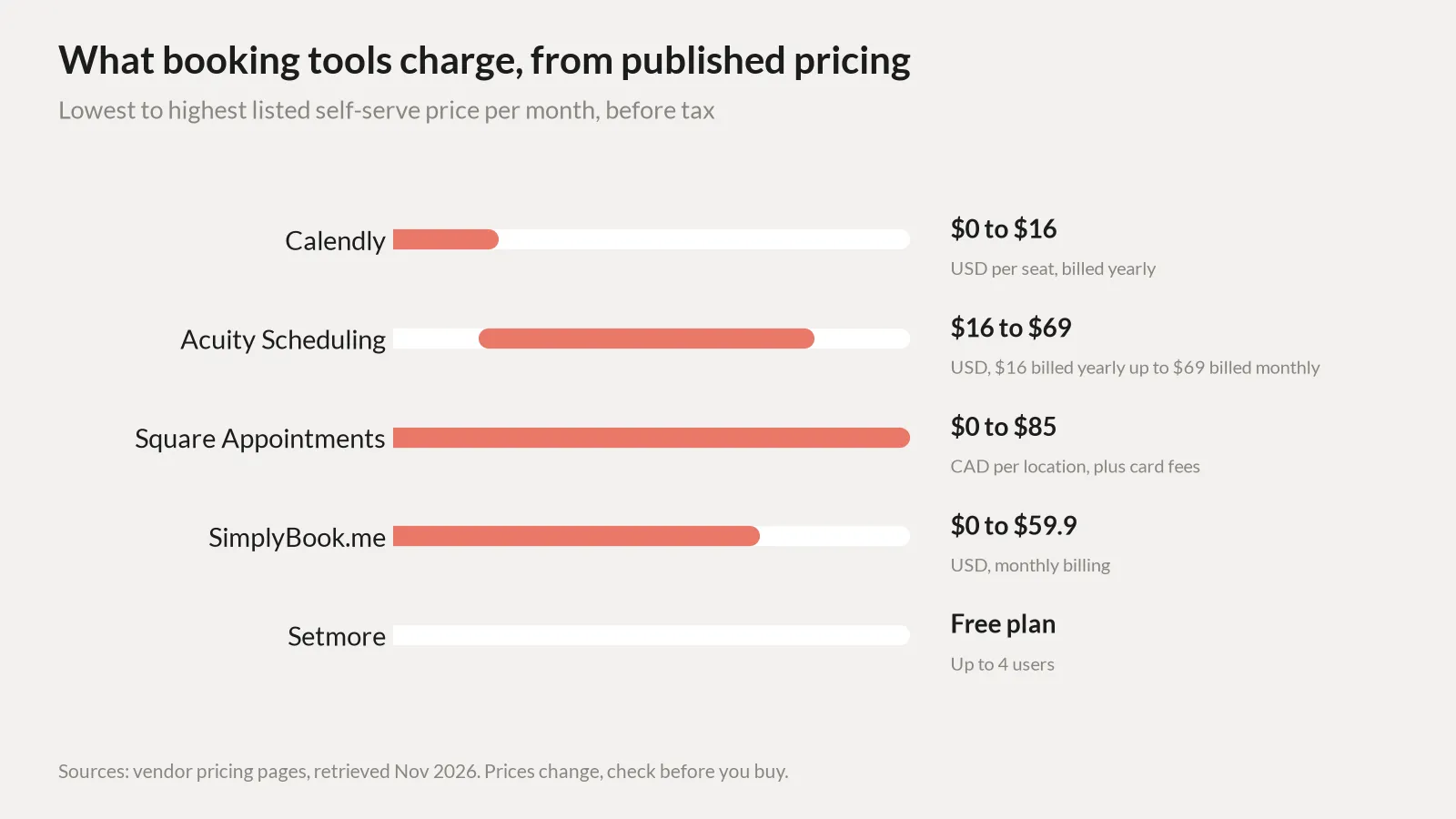
Prices move. Check the page again the day you sign up.
Custom makes sense when your rules don't fit. A contractor with every job at a different address needs travel time between them. A studio needs the room, the gear and the instructor free at once. Or the booking has to land in your CRM or your invoicing and the tool won't get it there, or you've got three apps held together with Zapier and it keeps breaking.
A lot of the time you don't replace the tool, you just connect it. Its API or webhooks push each booking into the rest of your systems, and that's usually the booking automation work that pays off first. Square only lets you write bookings through its API on the paid plans, and Setmore's API is on Pro. If you're weighing a full build, I ran the numbers for gyms in build your own gym software. Same math here.
AI agents, and where to start
The newer thing is an AI agent that books by chat, text or phone. Someone asks for Thursday afternoon, it checks your calendar, offers two times and books the one they pick. Acuity lists an AI Booking Assistant. SimplyBook.me sells credits for AI voice booking. Calendly has Callie, which schedules over email, but it's in beta and English only. For the phone itself there are AI receptionists, which I covered in AI receptionists for clinics and for gyms.
It earns its keep when bookings come in by phone or DM and nobody can answer. A restaurant at 7 p.m. on a Friday. A contractor up a ladder. If people already book online fine, fix the booking page first. There's more on how the agents work on the AI agents page.
Starting from zero? Online booking automation for a small business is one tool with real calendar sync, text reminders and a reschedule link. Run it for a month. Count the no-shows and the calls to move things. That tells you whether deposits or an agent are worth adding.
FAQ
What is booking automation?
It's the customer picking their own time off your real calendar, and then the confirmation, the reminder text and the reschedule link all go out without you touching it.
How do I automate online bookings on my website?
Sign up for something like Square or Calendly, connect your Google or Outlook calendar, put in your services and hours, then paste their booking button or widget onto your site. Turn the reminders on before you share the link.
Do automated reminders reduce no-shows?
In healthcare, yes. The Cochrane review had 78.6% showing up with text reminders and 67.8% with none. Salons, restaurants and the rest haven't been studied nearly as much.
Is a free booking tool good enough?
If it's just you, often yes. Square is free for one location and Setmore is free for up to 4 users, but on the free plans it's usually the text reminders or the calendar sync that's missing.
When should I get a custom booking system?
When the tool can't handle your rules, like travel time between jobs, or it won't connect to your CRM, and working around it costs more than building your own and keeping it running.
Next step
If you can't tell whether a tool will do it or you need something custom, book a call with Tom and we'll go through how you take bookings now.
Sources
- Calendly, "Pricing," retrieved Nov 4, 2026, https://calendly.com/pricing
- Acuity Scheduling, "Pricing Plans & Features," retrieved Nov 4, 2026, https://acuityscheduling.com/signup.php
- Square Canada, "Square Appointments Pricing & Plans," retrieved Nov 4, 2026, https://squareup.com/ca/en/appointments/pricing
- SimplyBook.me, "Pricing & Plans for Online Booking Software" (pricing last updated May 2026), retrieved Nov 4, 2026, https://simplybook.me/en/pricing
- Setmore, "Pricing," retrieved Nov 4, 2026, https://www.setmore.com/pricing
- Gurol-Urganci I, de Jongh T, Vodopivec-Jamsek V, Atun R, Car J. "Mobile phone messaging reminders for attendance at healthcare appointments." Cochrane Database of Systematic Reviews 2013, Issue 12, CD007458, retrieved Nov 4, 2026, https://www.cochrane.org/evidence/CD007458_mobile-phone-messaging-reminders-attendance-healthcare-appointments