
How to Set Up Cloudflare, ZipChat and Zendesk on a Shopify Store

This is a setup walkthrough for a pretty common stack. Your Shopify store keeps doing the selling, Cloudflare looks after your domain and email routing, ZipChat answers shoppers in a chat bubble, and Zendesk is where a real person picks up anything the bot can't handle.
None of it is hard. But each tool has one or two settings that quietly break things if you get them wrong, and I'll point those out as we go. I'm using a made-up demo store here, so swap in your own domain wherever you see example.com.
How the three pieces fit together
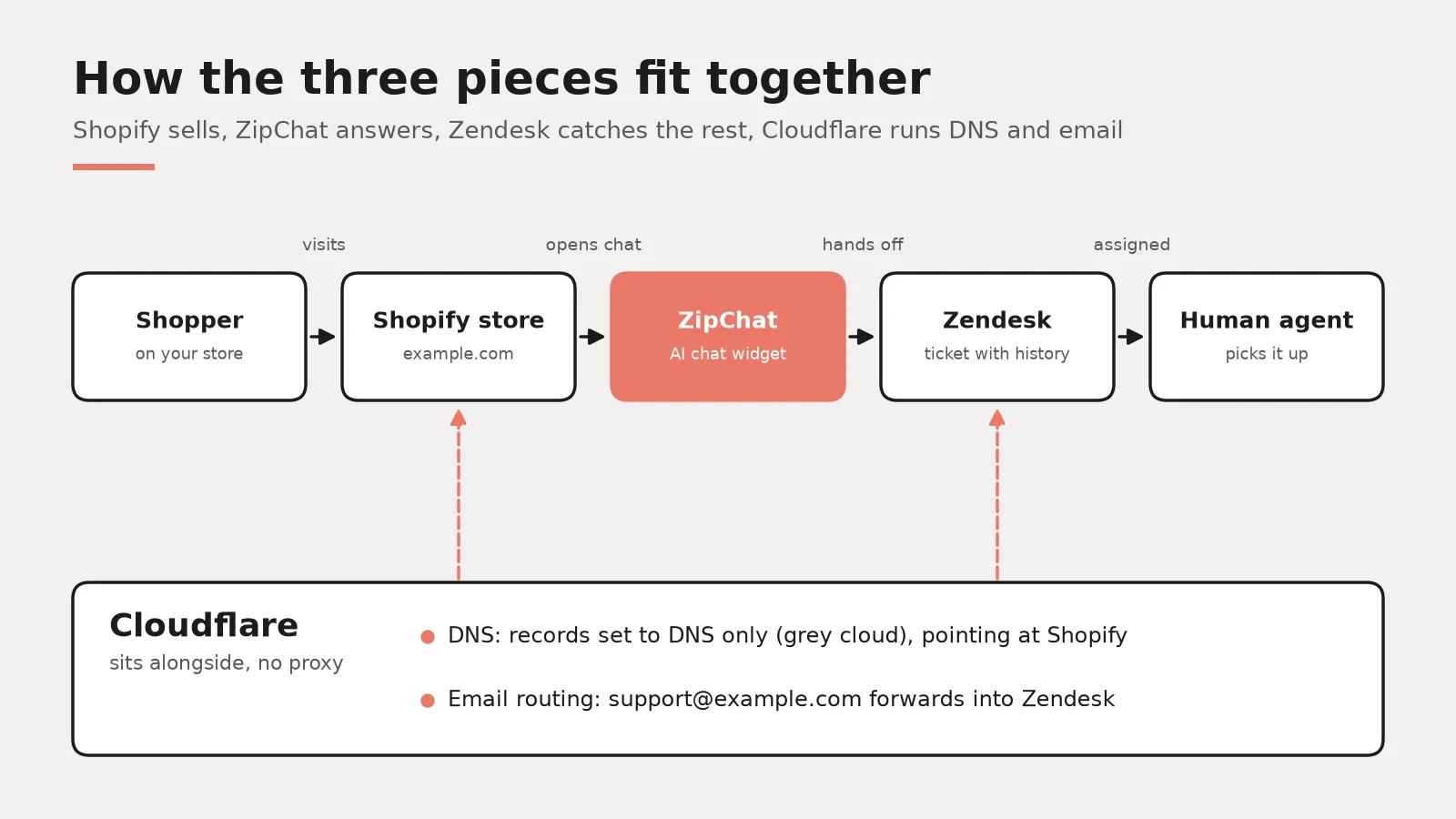
Think of it as a relay. Cloudflare sits at the very start, because it holds your DNS. It tells the internet that example.com lives on Shopify, and it can also catch mail sent to support@example.com and pass it along.
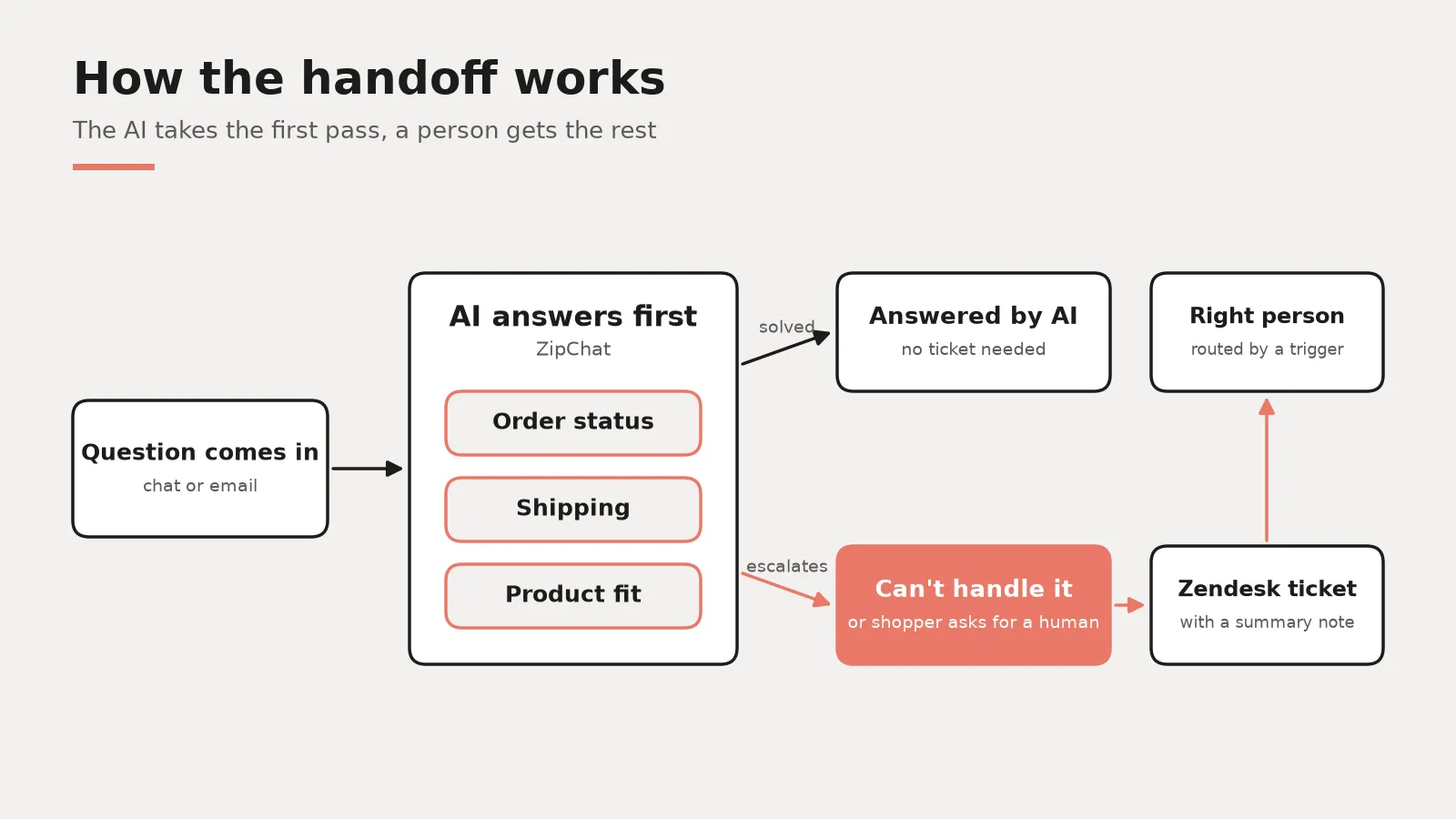
So a shopper lands on your store and opens the chat. ZipChat reads your products and policies through the Shopify app connection and answers on its own. When the shopper asks for a human, or the question is outside what you've allowed the bot to answer, ZipChat hands the conversation to Zendesk with the history attached. And emails that come in through your support address end up in Zendesk too, where ZipChat can take the first pass at them as well.
That's the whole loop. One knowledge base feeding the bot, one queue for your team.
Step 1: Cloudflare in front of Shopify (what actually works)
Here's the part people get wrong most. Shopify hosts your storefront and already runs it on its own edge network, which is itself backed by Cloudflare. So you don't need Cloudflare for caching or speed on a Shopify store. What Cloudflare is good for here is running your DNS and handling inbound email routing.
Point the domain at Shopify
In Cloudflare, open the domain and go to the DNS records. Shopify's help center lists the records you need for a root domain. It's an A record for @ pointing to 23.227.38.65, an AAAA record for @ pointing to 2620:0127:f00f:5::, and a CNAME for www pointing to shops.myshopify.com.
The important bit is the little cloud icon. Set every record that points to Shopify to DNS only, the grey cloud. Shopify's Cloudflare guide says plainly that Proxied records (the orange cloud) aren't supported, and that includes the setup Cloudflare calls Orange to Orange. Shopify also asks you to delete any wildcard record pointing at Shopify, and to check that any CAA records allow its certificate issuers.
Then in your Shopify admin go to Settings, then Domains, and click Connect existing domain. Cloudflare supports Shopify's automatic connection, so try that first. Shopify says it can take up to 48 hours to go fully live, though it's usually much faster.
A word on the orange cloud
You will find guides, including Cloudflare's own docs, that show how to proxy a Shopify store through your own Cloudflare zone. It technically works. Cloudflare even warns you not to turn on Always Use HTTPS in that setup, because it blocks Shopify from renewing your SSL certificate.
But Shopify's troubleshooting page says a proxy in front of the store is unsupported, could break at any time, and that issues it causes are outside the scope of Shopify Support. For a small store that's a bad trade. I'd leave it grey unless you have a specific security rule you truly can't live without.
Route support email for free
Cloudflare Email Routing is available on the free plan. You create a custom address like support@example.com and forward it to a verified destination. In this stack, that destination is your Zendesk support address (something like support@yourstore.zendesk.com), so every email becomes a ticket.
Cloudflare sends a verification email to the destination first, and it should land in Zendesk as a ticket you can open to confirm. One more thing. If you already use Google Workspace or another mail host for that domain, don't switch on Email Routing for the same addresses without checking your MX records, because routing replaces them.
Step 2: Install ZipChat on Shopify
ZipChat is on the Shopify App Store. You search for it, click Install and approve the permissions. That gives it read access to your products and orders through Shopify's Admin API, which is how it can answer stock questions and look up order status.
Next, turn on the chat bubble. ZipChat's docs recommend the theme app embed. In Shopify go to Online Store, then Themes, then Customize, open App embeds, switch on the ZipChat bubble and save. Inside ZipChat, check the visibility setting so the bubble shows on both desktop and mobile.
Then train it. Let it crawl your store pages and policies, and read through the answers in its test chat before you go live. ZipChat lets you set a core prompt for tone and rules, plus contact instructions for when someone wants a person. Spend real time on that contact field. It's what the bot falls back on when it gives up.
Step 3: Connect ZipChat to Zendesk
ZipChat has two ways of working with Zendesk, and you can pick one or use both.
The simple way: escalation by email
In the ZipChat dashboard go to AI Training, then Prompt and Tools, and switch on the Escalate Conversations tool. Choose in-app plus email notifications, and enter the email address connected to your Zendesk account. Per ZipChat's docs, escalated chats are then forwarded there and show up as normal tickets.
This is the fastest setup. The catch is that the customer's reply goes back by email, not inside the live chat.
The deeper way: ZipChat as an agent inside Zendesk
ZipChat's Zendesk guide walks through connecting it as a bot teammate inside your account. For email tickets, you add two triggers in Zendesk. One assigns each new ticket to the ZipChat bot and notifies ZipChat by webhook. The other notifies ZipChat when a customer replies to a ticket the bot owns.
When a customer asks for a human, the bot unassigns the ticket and leaves an internal note summarising the conversation, so your agent doesn't start from zero. If you use the Zendesk Web Widget for messaging, ZipChat's docs describe a Register Switchboard step that makes it the first responder there and passes escalations into the Agent Workspace.
Test it like a customer would. Send an email to your support address, check the bot replies, then ask for a human and make sure the ticket lands unassigned with that note. ZipChat says this doesn't need Zendesk's Advanced AI add-on, which matters for cost.
How this cuts the team's manual to-dos
Most of a small store's inbox is the same handful of questions. Where's my order, and can I return this. ZipChat can pull real order status from Shopify, so those stop reaching a person at all.
And routing gets simpler. Instead of someone reading every email to decide who handles it, the bot answers what it can and only escalates the rest, with a summary on top. You can also tell the bot to always escalate certain topics, like damaged items or refund requests outside your policy. In Zendesk, a basic trigger can then send those to the right person or group.
The thing I'd watch in the first month is how often your team reopens tickets the bot thought it solved. That tells you where the training is thin.
Can it help conversion and order value?
It can, but I'd be careful with expectations. ZipChat lists AI product recommendations on every plan, including the free one, so a shopper asking which size or which colour can get a real answer and a link to the product, which beats leaving the tab.
Cart help is the other angle. Someone hesitating over shipping costs or a return window often just needs the answer fast. ZipChat's prompt tools also let you set rules like offering a discount when a customer says something is too expensive, though I'd use that sparingly so you don't train people to complain.
So what do the numbers say? Start with the problem chat is trying to fix. Baymard Institute's cart abandonment list (last updated September 2025) puts the documented average at 70.22%. In Baymard's own survey, once you set aside people who were just browsing, 40% of US shoppers who abandoned said extra costs were too high and 13% pointed to the returns policy. Those are exactly the questions a chat bubble can answer on the spot.
On cost, Gartner's 2019 poll of service leaders found live channels like phone, live chat and email cost an average of $8.01 per contact, against about $0.10 for self-service. And a 2023 NBER study by Brynjolfsson, Li and Raymond, covering 5,179 support agents, found an AI assistant raised issues resolved per hour by 14% on average, and by 34% for novice and low-skilled agents.
Speed matters to buyers too. In Zendesk's CX Trends 2026 survey, 86% of consumers said responsiveness and accurate resolution highly influence their purchase decisions. That's Zendesk's own research, so read it as a vendor claim. Same goes for Salesforce's 2025 holiday data, which says retailers that deployed their own AI agents averaged a 6.2% year over year sales increase versus 3.9%.
What I still couldn't find is an independent, dated study showing that an onsite chatbot lifts average order value. So your own before and after numbers in Shopify analytics are still the honest test.
Keeping the costs down
Prices below were checked on October 12, 2026, in US dollars, and they move around, so check again before you budget.
ZipChat's Shopify App Store listing shows a free plan with 120 AI replies a month, which ZipChat says is around 50 conversations. The Starter plan is $80 a month, or $64 a month billed annually per zipchat.ai/pricing, with 750 replies. That's a fine place to test before you pay for anything.
On Zendesk's pricing page, Support Team is $19 per agent a month billed yearly ($25 monthly), and Suite Team is $55 per agent a month billed yearly. For a small team running ZipChat as the first line, Support Team is often enough because the bot does the chat.
Can several people share one Zendesk login?
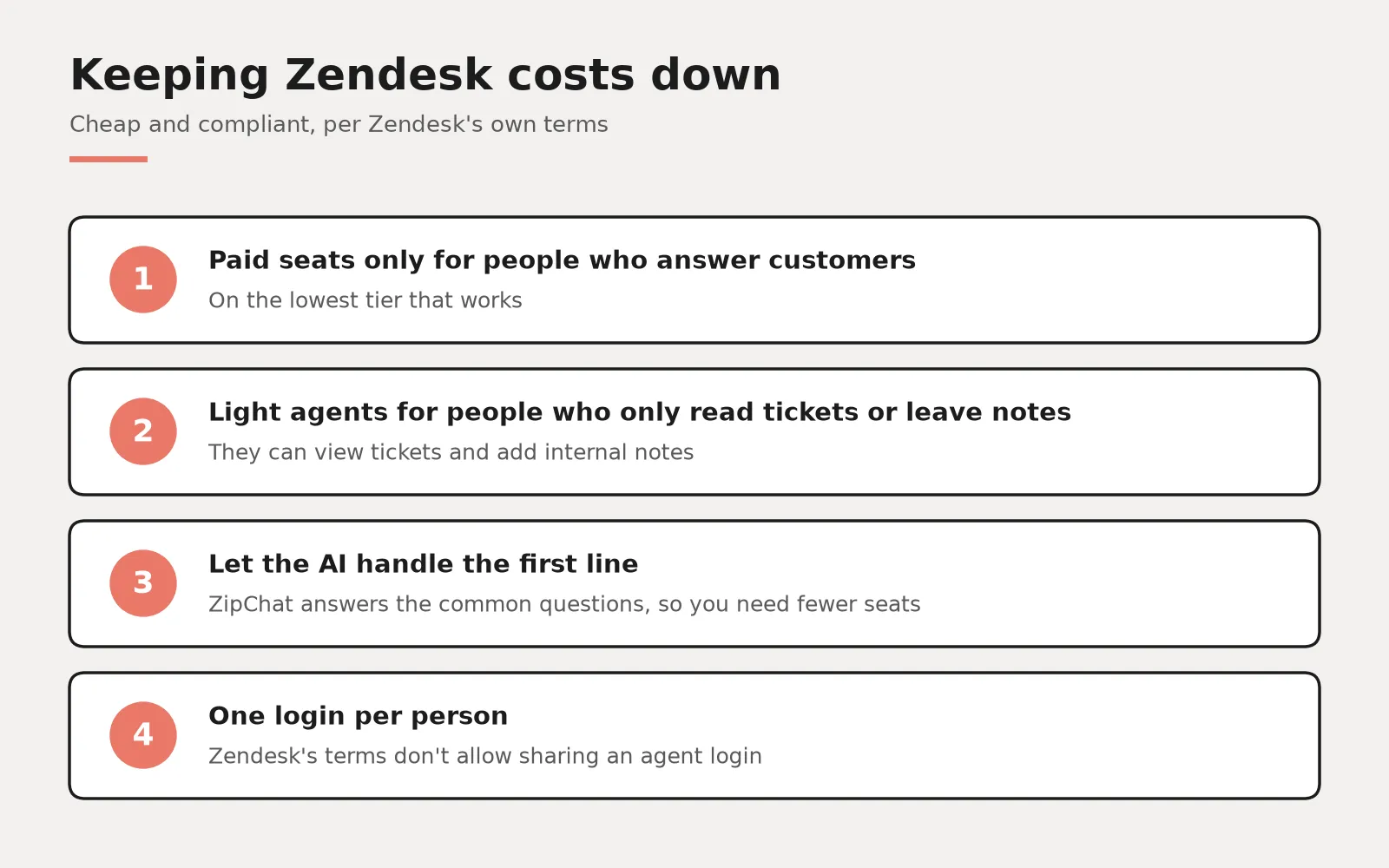
No, and I want to be plain about this because it's a common shortcut. Zendesk's Main Services Agreement says an Agent Login can't be shared or used by more than one individual, and its newer Customer Agreement lists using one purchased agent login for more than one person as a prohibited way to get around pricing. Zendesk's own help article says the same, and the agreement lets Zendesk charge for overuse.
So what's the cheap, compliant version? Pay for seats only for the people who actually answer customers, on the lowest tier that works. Let ZipChat handle the first line so you need fewer of those seats. And for people who only need to see tickets or leave an internal note, like a warehouse lead, look at light agents. Zendesk says Suite Growth includes up to 50 of them, while on Suite Team and the standalone Support plans they're a paid add-on. You can also reassign a login when someone leaves, which the agreement allows.
If you want help wiring the pieces together, our page on Shopify ecommerce development covers that side of things, and there's more on AI agents if you're thinking past a chatbot.
Book a call
If you're setting this up and want a second pair of eyes on your DNS or your Zendesk seat count, book a call with me. Bring your domain and a rough idea of your monthly ticket volume and we'll go through it together.